


Table of Contents
Highlights
- MailPoet integrates directly into your WordPress dashboard, simplifying email marketing.
- You can create beautiful Emails & Newsletters without leaving your WordPress website.
- The plugin helps you grow your mailing list with customizable opt-in forms & pop-ups.
- It offers a generous free plan of up to 1,000 subscribers, making it great for beginners.
- You can also set up your opt-in forms & subscription pop-ups using MailPoet
MailPoet integrates directly into your WordPress dashboard, simplifying email marketing.
Introduction
Are you looking for an easy way to handle email marketing directly from your WordPress site? Finding the right email marketing plugin can feel overwhelming. You need a tool that lets you create newsletters, manage subscribers, and send campaigns without a lot of technical hassle.
MailPoet aims to be that all-in-one solution.
This WordPress Email Marketing plugin is designed to simplify your communication, letting you build and grow your email list right from your dashboard.
In this blog we will discuss everything about MailPoet & by the end you will find out if this tool is the right choice for you.
Learn Technical SEO for Free on our Youtube Channel
MailPoet Overview
MailPoet is a popular newsletter plugin for WordPress, trusted by over 500,000 websites. It’s designed as a complete email marketing solution for WordPress users, allowing you to create, send, and manage your email marketing campaigns without ever leaving your site.
This tool simplifies how you connect with your audience. Whether you’re a blogger, an entrepreneur, or run an online store, MailPoet provides an intuitive way to handle your email needs. Now, let’s explore what makes this plugin special and how it fits into your WordPress site.
What makes MailPoet unique
MailPoet is designed to feel like a natural part of your WordPress dashboard. Once installed, it adds its own menu, where you can access all its features without logging into another service. This native experience is a huge benefit, as it simplifies your workflow and saves you time.
One of the key aspects of this integration is its use of your WordPress database. Your subscriber lists and email data are stored on your own site, giving you full control over your information. This is different from third-party services that host your data on their servers. The ease of use is a major plus; if you know your way around WordPress, you’ll find MailPoet very intuitive.
This WordPress plugin also integrates with the media library, allowing you to easily add images from your site directly into your emails. The whole process is designed to be seamless, making email marketing feel like a core function of your WordPress site rather than a separate, disconnected task.
Looking for boost your website & scale the rankings on SERP’s. Check out out SEO page & reach out to us
Key Features
MailPoet is packed with features designed to make your Email Marketing simple & cost-effective. Its more than just a Newsletter tool – its a comprehensive email marketing platform built for WordPress. From creating stunning emails to managing your audience, it has you covered.
You’ll find a user-friendly email composer, powerful subscriber management tools, and automation options to streamline your marketing.
Let’s look closer at some of the key features that make MailPoet a strong contender for your email marketing needs, including its templates, segmentation, and scheduling capabilities.
- Built-in Email Composer:
MailPoet comes with an intuitive email composer that makes creating beautiful emails a breeze. The drag-and-drop editor is similar to the WordPress block editor, so it will feel familiar to most users. You can easily add text, images, buttons, and even your latest blog posts directly into your newsletters.
You don’t need any design skills to get started. MailPoet provides a library of responsive templates that look great on any device. You can pick a template and customize it to match your brand’s style. Some of the elements you can add with the drag-and-drop editor include:
- Posts: Automatically pull in your blog posts
- Header & Footer: Create a consistent look for all your WordPress email communications.
- Social Buttons: Encourage subscribers to connect with your social media
- Images: Add visuals directly from your WordPress media library
This powerful email composer ensures you can craft professional-looking campaigns quickly and efficiently. You can preview how your email will look on both desktop and mobile before hitting send, giving you confidence that your message will be well-received.
2. Subscriber Management:
Managing your subscribers is simple with MailPoet. You can create different subscriber lists to organize your contacts based on their interests or how they signed up. This allows you to send targeted content to the right people, which can improve your engagement rates.
MailPoet also offers powerful segmentation options, especially in its paid plans. You can filter your subscribers based on their behavior, such as whether they opened an email or clicked a specific link. This allows for highly targeted campaigns. Some key segmentation features include:
- Interest-based Groups: Let new subscriber choose what kind of content they want to receive
- Behavioral Targeting: Create segment of users who have interacted with previous campaigns
This ability to organize your mailing list and segment your audience is crucial for effective email marketing. By sending relevant content to smaller, targeted groups, you can build a stronger relationship with your subscribers and get better results from your email efforts. All subscriber data is managed right within your WordPress dashboard.
3. Email Automation:
MailPoet helps you put your email marketing on autopilot. With its automation tools, you can create sequences that run without any manual effort. A great example is setting up a welcome email that automatically sends to new subscribers as soon as they join your list. This is a perfect way to make a great first impression.
You can also set up more advanced email campaigns. For instance, you can create a series of onboarding emails to nurture new leads or send notifications whenever you publish a new blog post. This ensures your audience stays engaged and informed about your latest content.
These automation and scheduling features are designed to save you time and improve your email marketing efforts. By sending the right message to the right people at the right time, you can build stronger relationships with your subscribers and drive more traffic back to your website.
MailPoet Set Up
Getting started with MailPoet is a straightforward process, even if you’re a beginner. The plugin is designed to work seamlessly with WordPress, so you can have it up and running in just a few minutes. The setup wizard guides you through the essential configurations.
Whether you’re installing it on your personal blog or a business website, the installation steps are simple. You can manage everything from your WordPress dashboard without needing to touch any code. Let’s walk through how to install and configure MailPoet for your WordPress site.
WordPress Repository
Installing MailPoet is just like adding any other WordPress plugin. The process is quick and easy, and you can do it directly from your WordPress dashboard. There’s no need to download files or use FTP.
To get started, follow these simple installation steps:
Navigate to “Plugins” > “Add New” in your WordPress dashboard.
Search for “MailPoet” in the search bar.
Click “Install Now” and then “Activate” once the installation is complete.
After activation, MailPoet will launch a setup wizard to guide you through the initial configuration. This wizard will help you set up your sender details and other important settings. Completing the wizard is crucial for ensuring your emails are sent correctly and don’t end up in spam folders.
Configuring Initial settings
After activating MailPoet, the setup wizard makes initial configuration a breeze. The first step is to enter your basic information, which is crucial for compliance with anti-spam laws. This includes your business name and address, which will appear in the footer of your emails.
Next, you’ll be prompted to choose a sending service. You can use MailPoet’s own sending service, which is recommended for better deliverability, or configure a third-party service. For beginners, using the MailPoet Sending Service is the simplest option. Key settings to configure include:
With its focus on ease of use, MailPoet ensures that even those new to email marketing can configure the plugin correctly. The guided setup helps you get all the essentials in place so you can start growing your list and sending emails right away.
- Sender name & Email Address: This is the “from” name & email address your subscribers will see
- Sign-up Confirmation: Enable this to require new subscribers to confirm their email address
- Subscribers Permissions: Decide who can manage lists & send Newsletters

Deliverability & Newsletter Performance
Creating a great newsletter is only half the battle; you also need to make sure it reaches your subscribers’ inboxes. Email deliverability is a critical factor for success, as it directly impacts your open rates and overall campaign performance. Poor inbox placement can render your efforts useless.
MailPoet addresses this by offering its own sending infrastructure designed to ensure your emails get delivered. Let’s examine how MailPoet handles deliverability and the tools it provides for tracking your newsletter performance, so you can see what’s working and what’s not.
Sending Infrastructure
MailPoet offers its own dedicated sending infrastructure, which is a major advantage. Sending emails directly from your web host can often lead to deliverability issues and land your newsletters in the spam folder. MailPoet’s email service is built to avoid this, boasting a high deliverability rate to ensure better inbox placement.
This service handles the technical aspects of sending emails, such as authentication with SPF and DKIM records. These are industry standards that help email providers verify that your emails are legitimate. By using the MailPoet Sending Service, you leverage a system optimized for sending high volumes of emails quickly and reliably.
Ultimately, this specialized sending infrastructure is designed to protect your sender reputation. It automatically manages bounces and complaints, which helps maintain a healthy sending record. This focus on deliverability means you can be more confident that your newsletter plugin will get your messages in front of your audience.
Opt-in Forms & Pop-Ups
Another great feature that MailPoet offers is Opt-in forms that you can easily embed on your website.
To grow your email list, you need an effective way to capture new subscribers. MailPoet includes a built-in form builder that lets you create subscription forms, and other opt-in types. This feature eliminates the need for a separate form-building plugin.
You can design forms that match your brand and place them strategically on your website to encourage sign-ups.
Let’s explore how you can customize these forms and some best practices for growing your email list with MailPoet.
Customizing Sign-Up Forms in MailPoet
MailPoet makes it easy to create and customize a subscription form to match your website’s design. Using an editor that feels similar to Gutenberg, you can build your sign-up form without any coding knowledge. You can add various fields to collect more information than just an email address, such as a subscriber’s name.
The customization options allow you to control the look and feel of your forms. You can change colors, fonts, and layouts to ensure they align with your brand identity. You can also choose how the form appears on your site. Placement options include:
Pop-up: Grabs attention by appearing over the content.
Slide-in: A less intrusive option that slides in from the side.
Fixed Bar: Stays visible at the top or bottom of the page.
You can also embed forms directly into your pages or posts using a shortcode or a dedicated block. This flexibility ensures you can place your sign-up form in the most effective locations to capture new leads and grow your mailing list.
Best Practices for Growing Your Email List
Building your email list is a continuous effort, but following some best practices can significantly speed up the process. The most important step is to offer something of value in exchange for an email address. This could be a discount, a free guide, or access to exclusive content.
The placement of your sign-up forms also matters. Don’t just stick a form in your footer and hope for the best. Use a combination of pop-ups, slide-ins, and embedded forms to capture visitors’ attention at different points in their journey. Some effective strategies include:
– Offer a Lead Magnet: Provide a free resource like an ebook or checklist to entice sign-ups.
– Use Clear Calls to Action: Tell people exactly what they’ll get when they subscribe.
– Enable Double Opt-in: This confirms that you have interested and engaged new subscribers, leading to healthier subscriber lists.
Remember to keep your forms simple. The fewer fields people have to fill out, the more likely they are to subscribe. By combining a compelling offer with well-placed, user-friendly forms, you can steadily grow your mailing list with high-quality subscribers.
MailPoet Pricing: Free Vs. Paid
MailPoet offers both free & paid plan, which makes it tricky to decide which one is right for you.
The free plan is very generous, making it a great starting point
for many users. It includes most of the core features you need to get your email marketing off the ground.
However, as your needs grow, you might consider an upgrade to a paid plan. The pro versions unlock advanced features, remove branding, and offer higher sending limits. Let’s compare the free and pro versions to help you understand the differences.
Feature | Free Version | Paid Plan (Business) |
|---|---|---|
Subscriber Limit | Up to 1,000 | Starts above 500, scales up |
Emails Per Month | Up to 5,000 (with MailPoet Sending Service) | Unlimited |
MailPoet Branding in Emails | Yes | No |
Basic Email Automation | Yes | Yes |
Advanced Automation Workflows | No | Yes |
Detailed Engagement Statistics | No | Yes |
WooCommerce Email Customization | Yes | Yes |
Priority Support | No | Yes |
MailPoet Reviews
Generall reviews of MailPoet are positive with many users praising the plugin performance in terms of deliverability, double opt-in confirmation & its solid automation features.
Users appreciate being able to manage the entire Mailpoet’s ecosystem right within the WordPress dashboard.
But like any other tool, Mailpoet comes with its own flaws. So let’s take a look at the Pros & Cons of this tool:
Pros:
– All in One solution: MailPoet combines Newsletter, Subscriber Management, Website Forms, Lists, Segments, & Website Pop-Ups into one powerful dashboard that lives inside WordPress
– MailPoet provides deep integration with WooCommerce for Ecommerce websites allowing you to send transactional emails
– MailPoet provides a free plan allowing you to get started for Free
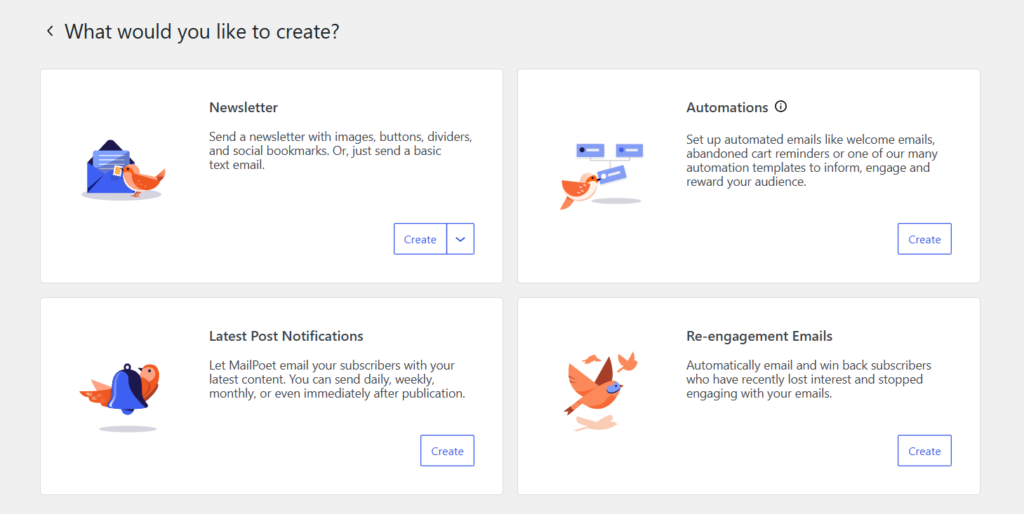
– MailPoet provides beautiful templates that allow you to set up Newsletters, Re-engagement emails etc
– ChatBot: A live chatbot icon will display right inside the WordPress dashboard through which you can seamlessly ask any questions related to MailPoet
Cons:
– Limited functionality: The Free version lacks advanced features making it limited in scope
– Technical Configuration: While getting started with MailPoet is easy, configuring third-party sending service can be complex for beginners
MailPoet Alternatives
MailPoet is a strong contender in the Email Marketing space inside WordPress – but its not the only tool out there. Depending on your specific need & use-case you’ll find other tools that might fit your requirements.
Lets take a look briefly at some of the alternatives:
- Brevo: Formerly known as “SendinBlue”, this is a powerful WordPress plugin which offers solid Email Marketing, Forms & Pop Up features.
- Fluent CRM: This is another great Email Marketing plugin that allows you to do everything that MailPoet offers.. Also, FluentCRM is self-hosted within WordPress website & also offers a free plan for Email Marketing
Ultimately, MailPoet is a fantastic choice for those who prioritize simplicity & a deep WordPress integration.
Conclusion
MailPoet stands out as a powerful tool for anyone looking to streamline their email marketing efforts within WordPress. Its user-friendly interface, coupled with robust features like built-in email composers, subscriber management, and automation tools, makes it an ideal choice for both beginners and seasoned marketers.
The ability to seamlessly integrate into WordPress sites enhances its appeal, ensuring that you can manage your email campaigns efficiently without any hassle. With the right setup and understanding of its capabilities, MailPoet can significantly improve your outreach and engagement.
If you’re interested in elevating your email marketing game, why not reach out for a free trial to explore all that MailPoet has to offer?
So, take control of your Email Marketing journey today!
Subscribe to our Newsletter to stay updated on all news related to this topic. If you have any questions, email us at mail@digital-doorway.com
Need Help?
Interested in scaling your business or get started in Digital Marketing?